Butler SMS Messaging Program
Last updated: November 11, 2026
About Butler · Contact support
About Butler
Dynamic Enterprises LLC, doing business as Butler, provides a platform that helps customers, service providers, and authorized business administrators coordinate services, account access, and service-related activity.
Messaging program purpose
Butler sends transactional, non-marketing SMS only for directly consented account-access invitations and optional new-message notifications for active Butler service conversations. Butler is the sender and system of record; providers and clients never receive each other’s phone number. Butler does not send SMS quote alerts, marketing messages, or bulk client invitations.
How recipients opt in
For every invitation, the authorized Butler administrator obtains the recipient's express consent before entering the recipient's mobile number. The administrator reads the applicable disclosure below and sends the invitation only after the recipient agrees. The administrator records the consent confirmation in Butler.
“Butler will text you a J&J Christmas Lights administrator invitation. Message frequency varies. Message and data rates may apply. Reply STOP to opt out or HELP for help. Your consent is not required to purchase goods or services.”
“Butler will text you a J&J crew invitation. Message frequency varies. Message and data rates may apply. Reply STOP to opt out or HELP for help. Your consent is not required to purchase goods or services.”
“Butler will text you an administrator invitation for this business. Message frequency varies. Message and data rates may apply. Reply STOP to opt out or HELP for help. Your consent is not required to purchase goods or services.”
Consent to receive text messages is not a condition of purchasing goods or services.
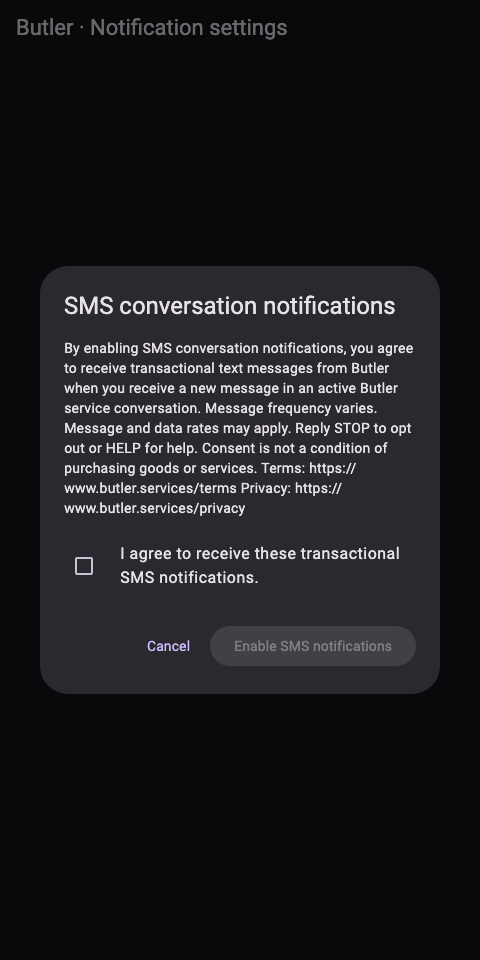
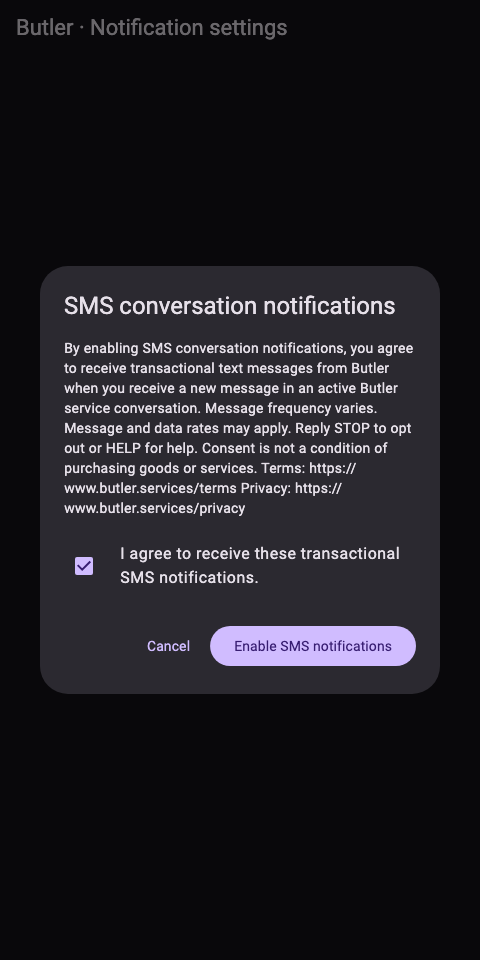
Users may also directly opt in from their authenticated Butler account settings to receive new-message notifications. The setting is off by default. A user with a valid U.S. mobile number on their profile must actively select an unchecked consent checkbox and then choose “Enable SMS notifications.” Butler records the authenticated user, normalized mobile number, timestamp, disclosure version, and web-form consent. If the phone number changes, the user must opt in again.
“By enabling SMS conversation notifications, you agree to receive transactional text messages from Butler when you receive a new message in an active Butler service conversation. Message frequency varies. Message and data rates may apply. Reply STOP to opt out or HELP for help. Consent is not a condition of purchasing goods or services. Terms: https://www.butler.services/terms Privacy: https://www.butler.services/privacy”
Account settings opt-in: public review evidence
The authenticated account flow is Profile → Notification settings → SMS conversation notifications. SMS starts off. Selecting the SMS setting opens the disclosure below. The checkbox starts unchecked and “Enable SMS notifications” stays disabled until the account holder checks it. Cancel does not enable SMS. Disabling the setting records an opt-out.
The images below render the same consent-dialog component used by Butler’s account settings in an isolated local UI test. They demonstrate the real control and disclosure without exposing a customer account or requiring a reviewer login. This public evidence page does not collect phone numbers or enroll anyone.
Atlas-connected headquarters service conversations currently use in-app messages and push only. Opening one does not enable SMS. Registered SMS program availability and carrier review are separate from consent; this page does not represent carrier approval.
Example messages
Butler: You have been invited to administer [affiliate business name]. Sign in or create a Butler account to accept: https://butler.services/affiliate-admin-invite/[unique-invitation-token] Msg frequency varies. Msg & data rates may apply. Reply STOP to opt out or HELP for help. Terms: https://butler.services/terms Privacy: https://butler.services/privacy
Butler: You have been invited to administer [Team name]. Sign in or create a Butler account to accept: https://butler.services/[Team-Name]-invite/[new-unique-invitation-token] Msg frequency varies. Msg & data rates may apply. Reply STOP to opt out or HELP for help. Terms: https://butler.services/terms Privacy: https://butler.services/privacy
Butler: You have been invited to join a J&J Lighting crew ([Team name]). Sign in or create a Butler account to accept: https://butler.services/crew-invite/[unique-invitation-token] Msg frequency varies. Msg & data rates may apply. Reply STOP to opt out or HELP for help. Terms: https://butler.services/terms Privacy: https://butler.services/privacy
Butler: You have a new message in an active service conversation. Open Butler to reply: https://butler.services/messages/[conversation-id] Msg frequency varies. Msg & data rates may apply. Reply STOP to opt out or HELP for help. Terms: https://butler.services/terms Privacy: https://butler.services/privacy
Butler: We could not identify the conversation for this reply. Open Butler to reply in the correct conversation or contact info@butler.services.
Butler help: contact info@butler.services for assistance. Reply STOP to opt out.
Butler: You are unsubscribed and will receive no further text messages.
Message frequency and charges
Message frequency varies based on the recipient's use of Butler. Conversation notifications are limited to one outstanding notice per conversation within approximately fifteen minutes, and a reply context expires after 24 hours. SMS replies are routed only when this unexpired context identifies exactly one active conversation; otherwise Butler directs the user to the app or support. Message and data rates may apply.
Opt out and help
Reply STOP to any Butler message to stop all Butler SMS immediately. Reply HELP for help, or email info@butler.services. After STOP, reply START to the Butler number to resume carrier-level SMS delivery.
Privacy and terms
Mobile opt-in information and consent are not shared with third parties or affiliates for their marketing or promotional purposes. Read our Privacy Policy and SMS Terms & Conditions.